Redes Sociales

miércoles, 19 de julio de 2017

Windows OS version from Major & Minor numbers

Sometimes during an audit you need to determine what's a specific System. Sometimes it's possible to obtain informacion y some SMB traffic is found, but if not, you can find some "BROWSER" traffic:

Sometimes there's no info available. In this cases one can determine the OS that sent this traffic by looking is Major & Minor numbers:

Operating System Version NumberMajor NumberMinor Number
Windows 95 OEM Service Release 1 (95A) 4.00.95040
Windows 95 OEM Service Release 2 (95B) 4.00.111140
Windows 95 OEM Service Release 2.1 4.03.1212-121440
Windows 95 OEM Service Release 2.5 C 4.03.121440
Windows 98 4.10.1998410
Windows 98 Second Edition (SE) 4.10.2222 A410
Windows Millenium Beta 4.90.2476490
Windows Millenium 4.90.3000490
Windows NT 3.1 3.10.528310
Windows NT 3.5 3.50.807350
Windows NT 3.51 3.51.1057351
Windows NT 4.00 4.00.138140
Windows NT 5.00 (Beta 2) 5.00.151550
Windows 2000 (Beta 3) 5.00.203150
Windows 2000 (Beta 3 RC2) 5.00.212850
Windows 2000 (Beta 3) 5.00.218350
Windows 2000 5.00.219550
Windows XP (RC 1) 5.1.250551
Windows XP 5.1.260051
Windows XP, Service Pack 1 5.1.2600.1105-110651
Windows XP, Service Pack 2 5.1.2600.218051
Windows XP, Service Pack 3 5.1.260051
Windows .NET Server interim 5.2.354152
Windows .NET Server Beta 3 5.2.359052
Windows .NET Server Release Candidate 1 5.2.366052
Windows .NET Server 2003 RC2 5.2.371852
Windows Server 2003 (Beta?) 5.2.376352
Windows Server 2003 5.2.379052
Windows Server 2003, Service Pack 1 5.2.3790.118052
Windows Server 2003 5.2.3790.121852
Windows Home Server 5.2.379052
Windows Longhorn 6.0.504860
Windows Vista, Beta 1 6.0.511260
Windows Vista, Community Technology Preview 6.0.521960
Windows Vista, TAP Preview 6.0.525960
Windows Vista, CTP 6.0.527060
Windows Vista, CTP 6.0.530860
Windows Vista, CTP (Refresh) 6.0.534260
Windows Vista, April EWD 6.0.536560
Windows Vista, Beta 2 Preview 6.0.538160
Windows Vista, Beta 2 6.0.538460
Windows Vista, Pre-RC1 6.0.545660
Windows Vista, Pre-RC1, Build 5472 6.0.547260
Windows Vista, Pre-RC1, Build 5536 6.0.553660
Windows Vista, RC1 6.0.5600.1638460
Windows Vista, Pre-RC2 6.0.570060
Windows Vista, Pre-RC2, Build 5728 6.0.572860
Windows Vista, RC2 6.0.5744.1638460
Windows Vista, Pre-RTM, Build 5808 6.0.580860
Windows Vista, Pre-RTM, Build 5824 6.0.582460
Windows Vista, Pre-RTM, Build 5840 6.0.584060
Windows Vista, RTM 6.0.6000.1638660
Windows Vista 6.0.600060
Windows Vista, Service Pack 2 6.0.600260
Windows Server 2008 6.0.600160
Windows 7, RTM 6.1.7600.1638561
Windows 7 6.1.760161
Windows Server 2008 R2, RTM 6.1.7600.1638561
Windows Server 2008 R2, SP1 6.1.760161
Windows Home Server 2011 6.1.840061
Windows Server 2012 6.2.920062
Windows 8 6.2.920062
Windows Phone 8 6.2.1021162
Windows Server 2012 R2 6.3.920063
Windows 8.1 6.3.920063
Windows 8.1, Update 1 6.3.960063
Windows 10 10.0.10240100
Windows Server 2012 R2 6.3.960063

CVE 2017-6017 Video Demo

At last I've ready a video demo of the vulnerability I found last year in the PLC Modicon M340. It was eventually catalogued as:

Other vulnerability databases mentioned it as well:

Ok, then, this is the demo video of the vulnerability (https://www.youtube.com/watch?v=9rz4rI82dWM):

This is very dangerous because an attacker could turn off very easily any of the more than 600 modicon devices currently accesible in internet:

For more information about this vulnerability, visit my previous entry in this blog talking about it.

I currently have an exploit both in python and Ruby, will publish them once the accessible vulnerable devices in shodan go below 100.

Meanwhile, there are many other toys waiting!!

miércoles, 14 de junio de 2017

Key points taken from the Industroyer/CrashOverride malware

I will not spread too much. After reading the CrashOverride report by Dragos (Good Job!!), some points show to be very clear:

  • It's not a malware for espionage purposes. There's no data exfiltration function in the malware.
  • It's more likely to be a destroyer malware (thus the Industroyer name), as there's a wiper module that "renders unusable" the systems where it run.

  • It has been clearly showed that this was the malware that caused the power disruption in Ukrayne in December 2016.
  • In a context of war in Ukrayne, it seems pretty clear who were the developers of CrashOverride.
  • This piece of malware relays on 4 industrial protocols to attack the power plant (IEC104, IEC101, IEC61850 and OPC-DA)
  • After Dragos and ESET reports it appears that, appart from the main team, a second team helped in developing the protocol modules
  • The malware looked and removed a specific type of industrial logic projects. The projects written with ABB PCM 600. It's very clear the knew what they were doing. They knew perfectly the plant and its processes
  • The strategy followed by the attackers was a little bit naive. It just sent values to PLC registers, for opening breakers, de-energizing thus the power plant.
  • However, if the infected system is turned down, an operator will be able to recover the power plant energy very quickly.
  • The malware did not have spreading features and the only way to persist was modifying a running service (svcdefrag) so that it can persist between restarts. However this is a little bit naive perstance method. It wasn't their purpose to persist too much time...
  • Strange enough, malware samples were compiled at 2:30 of December 18th (surely a fake time) while they were used on the attacks just before midnight of December 17th in Ukraine. This apparent inconsistency can be explained if the malware was compiled three time zones before the ukraine's one.
  • Another point that show that it was specially tailored for a specific power plant is that it attacked a specific Siemens protective asset (a Siemens Siprotec relay). Unfortunately since July 2015 these device lack a vulnerability that remains them unsable. Although a firmware update was published to fix this issue, clearly the ukrainian power plant did not fix hteir security problems.

To summarize:

It seems a tailored malware for specific power plant that was not intended to remain undiscovered. It was developed quickly and sent to the victim systems just a few menutes after being compiled. It was probably just a proof of concept and only the specific protocol modules could be used in future attacks.

The malware purpose was not industrial espionage but destruction. In a context of war between Russia and Ukraine and given that it seems to have been compiled two-three time zone east of Ukraine, it seems clear where this malware come from.

viernes, 26 de mayo de 2017

Industrial protocol wireshark dissectors

A list of industrial protocols and their wireshark dissectors to understand them a little bit better:

  1. CoAP --> Protocol Draft --> Wikipedia entry --> Wireshark dissector
  2. HART-IP --> Wikipedia entry --> Wireshark dissector
  3. GOOSE (IEC61850) --> Detailed analysis --> Wireshark dissector
  4. SV (IEC61850) --> Wireshark dissector
  5. Modbus/TCP --> Modbus specification --> Wireshark dissector
  6. OPC DA --> Wikipedia entry --> wireshark dissector
  7. Fieldbus HSE --> Detailed analysis --> Wireshark dissector
  8. IEC 104 --> Wikipedia entry --> Wireshark dissector
  9. Ethernet POWERLINK (EPL) --> Wikipedia entry --> Wirehark dissector
  10. Siemens S7 --> Wikipedia entry --> More info --> Wireshark dissector --> Siemens 300/400
  11. MMS (IEC61850) --> Wirehsark dissector
  12. OPC UA --> Some info --> Wireshark dissector
  13. Omron FINS --> https://github.com/wireshark/wireshark/tree/master/epan/dissectors/packet-omron-fins.c
  14. openSAFETY --> https://github.com/wireshark/wireshark/tree/master/epan/dissectors/packet-opensafety.c
  15. EGD (Ethernet Global Data)--> https://github.com/wireshark/wireshark/tree/master/epan/dissectors/packet-egd.c --> GE Fanuc
  16. DNP3 --> http://github.com/wireshark/wireshark/tree/master/epan/dissectors/packet-dnp.c
  17. Sinec H1 --> https://github.com/wireshark/wireshark/tree/master/epan/dissectors/packet-h1.c
  18. Profinet --> https://github.com/wireshark/wireshark/tree/master/plugins/profinet/
  19. EtherCAT --> https://github.com/wireshark/wireshark/tree/master/plugins/ethercat/
  20. SERCOS III --> https://github.com/wireshark/wireshark/tree/master/epan/dissectors/packet-sercosiii.c
  21. RTPS --> https://github.com/wireshark/wireshark/tree/master/epan/dissectors/packet-rtps.c
  22. TTEthernet --> https://github.com/wireshark/wireshark/tree/master/epan/dissectors/packet-tte.c
  23. CDT --> https://github.com/wireshark/wireshark/tree/master/epan/dissectors/packet-cdt.c
  24. EtherNet/IP --> https://github.com/wireshark/wireshark/tree/master/epan/dissectors/packet-etherip.c
  25. CIP --> https://github.com/wireshark/wireshark/tree/master/epan/dissectors/packet-cip.c
  26. CIP Safety --> https://github.com/wireshark/wireshark/tree/master/epan/dissectors/packet-cipsafety.c
  27. DeviceNet --> https://github.com/wireshark/wireshark/tree/master/epan/dissectors/packet-devicenet.c --> Allen-Bradley
  28. BACnet --> https://github.com/wireshark/wireshark/tree/master/epan/dissectors/packet-bacnet.c
  29. KNXnet / IP --> https://github.com/wireshark/wireshark/tree/master/epan/dissectors/packet-knxnetip.c
  30. Lontalk --> https://github.com/wireshark/wireshark/tree/master/epan/dissectors/packet-lon.c --> LonWorks-
  31. CANopen --> Wikipedia entry --> Wireshark dissector
  32. SAE J1939 --> https://github.com/wireshark/wireshark/tree/master/epan/dissectors/packet-j1939.c --> CAN
  33. USITT DMX512-A --> https://github.com/wireshark/wireshark/tree/master/epan/dissectors/packet-dmx.c
  34. BSSAP/BSAP --> https://github.com/wireshark/wireshark/tree/master/epan/dissectors/packet-bssap.c --> Bristol Babcock Inc
  35. Gryphon --> https://github.com/wireshark/wireshark/tree/master/plugins/gryphon
  36. ZigBee --> https://github.com/wireshark/wireshark/tree/master/epan/dissectors/packet-zbee.h

...and of course there are many more left...

lunes, 27 de febrero de 2017

Discovering Tofino Xenon

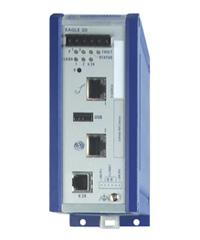
Tofino, apart from a lovely area in the west coast of Canada is a security company that develop products like Tofino Eagle or Tofino Xenon.

The first one is the name of a series of industrial specific routers and the second is an industrial firewall. I was lucky enough to get in contact with a Tofino Xenon and could test its characteristics. The purpose of this post is to capture my experiences with it.

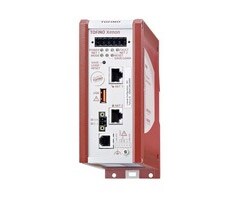
Tofino Xenon

Tofino Xenon is an industrial firewall with state inspection (Stateful firewall - SPI) and Deep Packet Inspection (DPI), that allows the user to filter both Modbus and Ethernet-IP industrial traffic.

Among its characteristics, we should mention that it has two Ethernet 10/100Mbps port and that it works in a transparent on the link layer OSI 2 level, as if it was a bridge device. On the other hand it has the capability to be mounted in a rack through a DIN rail.

The installation is very simple. The manufacturer recommends to install it "just in front of" the PLC or field device that we need to protect and "install a Tofino for each device we need to protect". Taking into account the price of a Tofino Xenon, that's a huge economic effort and not all companies can afford to follow these instructions...

We tested a Tofino in a testbed at the CICLAB laboratory in the University of Leon (in Spain). We connected it, on one Ethernet port to a typical 4 port non-industrial switch and on the other Ethernet port to a Schneider-Electric M340 PLC.

Our objective was to understand how the Tofino Xenon worked. We were not prepared to not even being able to connect to it. Our first difficulty was to discover the MAC address of the Tofino Xenon. We knew that the manufacturer provided a discovery application (Tofino Configurator) that allows to operate with the Tofino Xenon. However we wanted to test on our own, mainly because Tofino Configurator only works for Windows systems... After a few minutes we realized that Tofino Configurator is actually a Java development which is been later compiled into a .exe file.

So, we connected to the Tofino Xenon as explained and tried to discover it on our own. The device itself comes with a sticker which stated the "Tofino ID”. which appeared to be a MAC address. However, the more we tried to "NetDiscover" that mac address (or any other), we didn't find any network device connected to the network:

Eventually we got to find some documentation mentioning that the Tofino ID was actually the MAC address, but this device kept invisble for us. Finally a youtube video ( TV201: Tofino Orientation - https://www.youtube.com/watch?v=gigtan466rA), shed some light into our situation. We then realized that device (as it's stated in the documentation) works at Level 2 OSI, and therefore it never adquires any IP address.

We then realized that Tofino Configurator has a peculiar way of discovering Tofinos:

  1. Tofino Configurator only works if there are two devices (or networks) connected to the Tofino, one to each Ethernet Port.
  2. With this configurator, it sends a UDP packet simulating to be a device connected to one of the ethernet ports, and that packet is sent to another device which is in the network connected to the other Ethernet port of the Tofino Device. This UDP packet will be sent to the 6689/UDP port of the "destination device".

    Tofino Xenon discovery performed with Tofino Configurator

  3. Tofino Xenon detects this packet and returns a new UDP packet to the originator, apparently from (and therefore faking) the address of the UDP destinee. However is actually Tofino Xenon who is replying. This UDP request never arrives to the destination.
  4. When this UDP packet is returned, a TCP conversation starts between our computer and the the Tofino Xenon.

The following is a Wireshark screenshot of the whole process traffic:

As you can see from our IP address (10.10.13.136) a UDP packet is sent (packet 24) to a device which is located on the other network (10.10.13.200). This IP address belongs to a computer connected directly to the Tofino on the other Ethernet port.

The UDP packet is sent against port 6689 of the destinee. As there's nothing listening on port 6689 of the destination computer, this returns an error ICMP reply (packet 25) -in black-, but, at the same time, the originator receives as well a UDP packet (packet 26), apparently from the same destination IP and from the port 65002. Packet 26 is actually sent by the Tofino Xenon, when it detects a the previous UDP packet which travel between its ethernet ports. This UDP packet is clearly parsed by the tofino Xenon, which clearly shows, it's a stateful firewall.

Tofino Configurator sends next, from the origin IP (10.30.13.136), a second -slighly longer- UDP packet (packet 30), which is never replied by the Tofino Xenon.

Finally Tofino configurator starts a TCP conversation (packets 36 on) where the Tofino Xenon configuration information is interchanged.

Information interchanged next through a TCP (encrypted) connection

Our first objective was trying to understand the UDP "handshake" sent between Tofino configuration and Tofino Xenon, but we were not able to understand the UDP payload. It sends a 68 byte payload. From thos 68 bytes, bytes 21 to 36 (16 bytes) were always the same, in all discoveries we tried. It could be any license key from the Tofino Xenon.

The rest of the bytes are clearly encoded or even encrypted data (no bytes 00 or FF were found):

We tried to write our own script in order to be able to connect and configure the Tofino Xenon. We used python and Scapy to do it:

Even when we followed the steps previously mentioned, the Tofino Xenon did not reply to the UDP packet on port 6689. We eventually tried to connect a second Tofino Configurator software to try to work in two computers at the same time. And then we realized that we could connect to Tofino Xenon from towo machines at the same time.

Somehow, Tofino Xenon maintains a connection status and the MAC address from the "owner" client of the firewall. It seem to store any kind of state table that stores which MAC address is the "Master", and only this Master has the capabilities of access and modification over the Tofino Xenon configuration.

So to confirm this hypotheses, we resetted the Tofino Xenon. Again, only the first "client" was allowed to configure the Tofino Xenon. It seems that once a "master" takes control of the Tofino, no other device is allowed to even "discover" it (UDP packets to port 6689, do not work any more).

DoS

Another test we performed was to send it a hugh amount of UDP packets to port 6689. We detected that, if Tofino has already been discovered, Tofino simply discarded and relied UDP packets to port 6689. But if Tofino had NOT been already discovered and a 6689/UDP packet flooding was performed, a Denial of Service occurred, as no other IP could discover Tofino, because it was working on parsing all malicious UDP packets.

"Pickpocketing" Tofino

Then we deciedd to try to "pickpocket” Tofino Xenon to a legitimate Tofino Configurator who had legitimely discovered it.

We tried hard and harder but we were not able to accomplish this task. Once a UDP to port 6689 passes through Tofino, the device stops replying to any request not coming from the owner/master who has discovered it. Only when we modified/faked our attacking MAC address to be the same of the legitme master could we receive any reply from Tofino.

Next test was to try to understand the “protocol” used between the Tofino Configurator and the Tofino Xenon. We obtained a pcap file with the traffic interchaneg between both of them. We found that:

  • Tofino Xenon comes with an embedded OpenSSH server. it's banner says it's a OpenSSH 6.4 (from 2014)
  • Tofino Configurator uses a library named Ganymed to connect to Tofino Xenon. This library was implemented in 2006.

All the configurator initialization process, the Tofino rules which are sent to the device, the reset process and many other functions offered by Tofino Configurator are performed through encrypted commands sent via SSH.

A second script was implemented with Scapy that emulated that encrypted communication, from a previously obtained pcap file. However, although the connection was established, logically, the encryption key need to be different to the one used in the captured pcap, so we could not continue on this path.

This way, after a promising initial connection establishment, the Tofino cutted of the communication once the key interchanged process was not able to finish properly.

After a number of further tests we realized that the encryption key negotiation was RSA-SSH. We tried to modify the encryption algorithm for this negotiation. As it can be seen in the following capture, the negotiated protocols go in plain text and we could modify them, removing all but "None":

Eventually we discovered that the Tofino Configurator library allows the "None" cyphering algorithm, however Tofino Xenon does not. At this point, we decided to give up in our attempts to compromise Tofino Xenon.

Summary

Tofino Xenon is a secure Industrial Firewall. It includes a number of security features (it is only discovered at level 2 OSI, all communication is performed via SSH, and therefore encrypted, etc). However I wouldn't say it's unbreakable. From our point view, it's been only the lack of time that has stopped us from compromising it. It's not easy, but it does not seem impossible.

Several tests could not be performed:

  • Continue working on the encryption and encryption key negotiation process
  • Decompiling Tofino Configurator in order to understand how the Configurator work

However one possible vulnerability was found, as the device stops responding when it has not been discovered and it's flooded with UDP packet to port 6689. This cannot be considered a vulnerability, as the first step an operator does when installing the Tofino Xenon. And once a PC connects to the Tofino, it cannot be used by other "client" unless it's reset.

Given the price of the device, the manufacturers should have put stronger efforts on securing point like:

  • Not using Java for Tofino Configurator Development
  • Adding more protocol that can be inspected by the firewall
  • Avoid flooding attacks

Surely inside Tofino there's a Linux OS, or maybe a VxWorks OS. But surely it implements a iptables firewall inside it.

From our point of view, it would be much cheaper to implement a industrial firewall using a computer with a well-tested set of iptables rules.

P.S: These tests were performed by the members of the CICLAB Group at the University of León (Juanma, Jacinto, Borja and me).

miércoles, 22 de febrero de 2017

Resource exhaustion vulnerability on Schneider-Electric M340 PLC

Introduction

Past May, while working at the CICLAB laboratory of the University of Leon (Spain), I came across with a vulnerability on the PLC (Programmable Logic Controller) I was working with. For a research paper, which is currently under review, I had to deal with the configuration protocols used by the different PLCs I had in my testbed. The testbed consists of a number of PLCs from different vendors, among them Schneider-Electric.

Schneider-Electric PLCs configuration protocol is an evolution of the well-known modbus protocol, but using only the 0x5A Function Code. This protocol (or subprotocol), named internally "UMAS", has not been publicly specified, and therefore it had to be reverse-engineered.

After decoding this "UMAS" protocol (which I will explain in a future entry of this blog), I tried to send some invalid traffic to test the robustness of the PLCs.

From the Schneider Family of PLCs I had two different models in my testbed, a M580 PLC and a M340 PLC. After several tries, I was not able to compromise the Schneider-Electric M580 PLC, however when tried to send specially crafted UMAS packets to the M340 PLC, I found it stopped replying to ping commands.

This behaviour was tested using three different firmware versions. The M340 PLC seemed vulnerable, even when working with the latest firmware version (V2.70 at the moment).

Schneider Electric was contacted. I sent them an explanation of the problem together with a "pcap" file that showed the problem. Very quickly they let me know they had done their own tests and that it was a real vulnerability. It was finally published as the security notification SEVD-2017-048-02. The ICS-CERT has not released the public advisory yet, but they're on the way.

I must say they have been very very professional.

The Schneider-Electric M340 PLC

Explanation of the vulnerability

As mentioned earlier, this vulnerabilities is based on the modification of a series of legitimate "UMAS" packets sent in a specific order. "UMAS" is a configuration protocol that allows the software clients (Unity Pro and Vijeo Citect among others) to connect, configure and monitor Schneider-Electric PLCs. More than 20 different subfunction codes have been determined. These function codes allow the client to perform different tasks (Check keepalive, start/stop, upload/download strategies, read/write memory, etc).

One of these "subfunction codes" allow the client to "read" from the PLCs memory asking for a number of bytes to be read, starting from an offset of a "Memory block" (specified by a 16 bit number).

These memory blocks store different types of information (unlocated variables, system words, function blocks, etc). Every memory block has a different size (or top offset), depending on the data stored (sometimes it's 0x5B00, sometimes 0x3F00, sometimes 0xF500...). When trying to read memory over the "top offset" of a memory block, the PLC got locked. This happened with different "memory blocks", always that you sent a UMAS_read_memory request reading over the top offset of the block.

That's what, in other words Schneider-Electric explain with the following sentence:

The software does not properly restrict the size or amount of resources that are requested 
or influenced by an actor, which can be used to consume more resources than intended. 

After sending this series of packets, the PLC got freezed and only could be recovered by approaching physically to the device and resetting it manually.

The following image show a wireshark capture at the moment where this packet (#133) is sent. Before the packet is sent the PLC (IP 10.1.0.102) replies to the different requests done by the client (10.8.0.101). It can be seen as well that a few seconds later some ping commands are sent and the PLC do not reply them:

Wireshark capture of the moment of the attack

The vulnerable UMAS packet is shown shadowed, but it can be seen that it requests the offset 0xF503 (while the top offset is 0xF500.

The following image shows the python script written for testing purposes. In the screen of the right the script is launched, in the screen of the right a ping command is running and suddenly it stops showing ping connection (when the exploit packet is finally sent).

Scripts used for the test

Current Situation

Schneider-Electric bundled a number of fixes in a new firmware version (V2.90) which was released on December 21st. However, 2 months after the public release, very few from the currently available Schneider-Electric M340 PLCs are currently protected.

The Schneider-Electric public disclosure of this vulnerability was published a few days ago.

A simple search in shodan for on of the affected devices (looking for "BMX P34 2020") show that more than 700 devices (of this type) are currently accessible to internet and have not been upgraded to the firmware version V2.8 or V2.9.

Shodan capture showing more than 700 vulnerable devices

This means that more than 700 potentially critical devices could be sent offline remotely in a question of seconds. I have an exploit script for metasploit ready, but clearly it will not be publicly released for a few months (or years!).

Acknowledges

The discovery of this vulnerability has been possible by the funding of INCIBE and thanks to the support of the colleagues of the CICLAB Laboratory at the University of León (Jacinto, Juanma and Borja) and the rest of the guys of the IAF.

lunes, 30 de mayo de 2016

Cifrado (y III)

Cifrando correos electrónicos

Mucha información muy confidencial se envía a diario usando el correo electrónico. Si esto se realiza sin ningún tipo de cifrado cualquier podría leer lo que escribimos y mandamos en ese correo en cualquiera de los puntos intermedios por los que pasa el mensaje (recordemos que cualquier comunicación realizada a través de internet pasa por los servidores del ISP que tenemos contratado, los servidores del servicio que nos dan el servicio (por ejemplo los de google si usamos gmail) y los servidores finales de la empresa receptora. En cualquiera de esos puntos podría haber alguien leyendo los contenidos de nuestro mensaje.

Desde Microsoft Outlook 2007 es posible cifrar los mensajes de forma individual o en su conjunto (todos los que mandemos). Para ello, es necesario disponer de un certificado personal, como los que expide la Fabrica Nacional de Moneda y Timbre o entidades certificadoras como VeriSign. Pero de una forma más barata, podemos usar tambien el DNI Electrónico, aunque para mandar correos firmados por el DNI electrónico es necesario:

  1. Que nuestro DNI tenga los certificados en vigor (si no estamos seguros lo mas probable es que la respuesta sea que no, por lo que habrá que acercarse por una comisaria de policia para renovarlos).
  2. Conocer la contraseña (privada) de esos certificados.
  3. Un lector de smartcards y los drivers correctamente instalados.
  4. Un programa de correo compatible con S/MIME (practicamente todos hoy en día. MS Outook nos vale).
  5. Modificar un entrada del registro de Windows.

Voy a suponer que los cuatro primeros puntos ya los tenemos conseguidos, por lo que me centraré en el punto 5 y continuaré. Para poder mandar correos electrónicos firmados digitalmente por el DNI electrónico con Outlook es necesario abrir el Editor de Registro y modificar una entrada del registro:

  1. Menu de inicio --> Ejecutar --> regedit.exe
  2. En la parte izquierda de la ventana hacer clic en HKEY_CURRENT_USER.
  3. Dentro de HKEY_CURRENT_USER, aun en la parte izquierda hacer clic en Software, luego en en Microsoft, y luego en Office.
  4. Dependiendo de la version que tengamos deberemos entrar en 12.0, 14.0 o 15.0 (version 2007, 2010 y 2013 de Office respectivamente).
  5. Por ultimo y aun en la parte izquierda ir a Outlook y luego a Security.
  6. En este momento hay que mirar la parte derecha y buscar una entrada que se llama "SupressNameCheck". Si existe este debe tener como valor "1". Si no es asi, hacer clic dos veces sobre ese valor y modificar el "0" por el "1". Si no existe, hacer click con el boton derecho del raton sobre la parte derecho de Editor de Registro y hacer click en "Agregar". Aparece una nueva ventana de dialogo que nos permitirá crea una nueva entrada con el nombre "SupressNameCheck" y con el valor "1".
  7. Una vez hecho esto, podemos cerrar el Editor de Registro y reiniciar el Outlook.

Una vez reiniciado Outlook, y con el DNI electrónico conectado y reconocido (lucecita verde del lector), para cifrar un mensaje suelto, en el mensaje, haremos clic en Opciones --> Mas opciones --> Configuración de seguridad --> Cifrar el contenido del mensaje y de los datos adjuntos, y le daremos al botón "cambiar configuración" y en la nueva ventana, el boton "Elegir" nos permitirá seleccionar el certificado del DNI electrónico.

Para que todos nuestros correos electrónicos se envien cifrados, es necesario crear y aplicar una nueva "configuracion de seguridad". Para ello es necesario ir a Archivo --> Opciones --> Centro de Confianza -->Configuracion del centro de confianza --> Seguridad del correo electrónico --> Configuracion --> Ponerle un nombre a la nueva configuración de seguridad --> Escoger el certificado de cifrado --> Aceptar --> Escoger esta nueva configuración como configuracion predeterminada.


Cifrado de correos con GNUPG

GNUPG es una herramienta de cifrado y firmas digitales, que viene a ser un reemplazo del PGP pero con la principal diferencia que es software libre. Dispone de varios plugins para los principales clientes de correo. GNUPG para windows se puede descargar de https://gpg4win.org/download.html

GNUPG es un paquete de utilidades de cifrado que incluye:

  • GnuPG, el motor de cifrado, la herramienta que se encarga de todo el proceso.
  • Kleopatra: la utilidad para gestionar certificados desde una interfaz gráfica cómodamente.
  • GpgOL: la extensión de Outlook para cifrar y firmar correos de forma sencilla.
  • GpgEx: la extensión de Explorer para cifrar o descifrar con el botón derecho.
  • Claws Mail: un cliente de correo electrónico.

Por desgracia GpgOL solo funcionaba hasta Outlook 2003. Ahora es posible contar con una extensión más: Outlook Privacy Plugin, que amplía el soporte para las versiones más recientes: 2010 y 2013, tanto en 32bits como en 64bits. Eso sí, siempre en Windows Vista, 7 ó 2008, ya que requiere del Framework 4.5 de .NET y este no se encuentra disponible en el ya obsoleto y decadente Windows XP.

La puesta en marcha es un poco engorrosa, una vez configurado Gpg4win y el ya comentado framework 4.5 de .NET, se ha de instalar también Visual Studio 2010 Tools for Office Runtime de Microsoft y por último la última versión disponible del plugin, que está en continuo desarrollo y fase BETA (o dicho de otra forma, mejor que nada y prepárate para algún que otro casque)

En https://www.isecauditors.com/sites/default/files/files/iseclab2.pdf podemos encontrar un manual muy completo para la configuración y uso de GNUPG para el cifrado de mensajes con Microsoft Outlook y otras herramientas de correo.


Cifrado en Gmail

Aunque el acceso a gmail se realiza siempre utilizando https y por tanto nadie puede interactuar en nuestra lectura de los correos. A la hora del envío el correo electrónico circula por los diferentes servidores de salto "en claro".

Para poder cifrar correos de gmail podemos usar diferentes técnicas:

  • Si usamos Google Chrome, podemos instalar los plugins "Mymail-Crypt for Gmail" (https://chrome.google.com/webstore/detail/mymail-crypt-for-gmail/jcaobjhdnlpmopmjhijplpjhlplfkhba?utm_source=chrome-ntp-icon), "Secure Gmail by Streak"
  • En mozilla Firefox tenemos el complemento "Gmail S/MIME"

Recepción de correos cifrados

Antes de empezar a enviar mensajes de correo electrónico, cifrados, tú, como emisor y los receptores de tu correos debeis obligatoriamente intercambiar vuestras claves públicas. También debeis confirmar la validez de cualquier clave que acepteis confirmando que en realidad pertenece al supuesto remitente.

En Thunderbird con Enigmail esto se hará en la opción OpenPGP --> Adjuntar Mi Clave Pública cuando estemos escribiendo un correo electrónico.

Cuando recibamos un correo cifrado en Thunderbird nos aparecerá algo asi:

Para poder ver el mensaje deberemos, como indica el mensaje, hacer clic en el boton "Descifrar" de la parte superior de Thunderbird. En ese momento se importará automaticamente la clave pública del emisor, se descifrará usando su clave pública y a continuación se nos pedirá la contraseña para poder descifrarlo usando nuestra clave privada.

En ese momento, tendremos el mensaje en claro.


Firma electrónica

Una firma digital se consigue calculando un valor hash, que es un valor único que cambia cada vez que se modifica lo mas minimo un documento (un espacio en blanco mas o menos, implica un valor hash completamente diferente). Ese valor hash se adjunta al final del documento y se cifra para que nadie pueda leerlo más que el receptor. De esta manera que el receptor del mensaje o documento, lo primero que hace es descifrar el hash, calcular el hash del mensaje o documento y comprobar si son iguales. Si son diferentes, advertirá al usuario de que podría haber habido una modificación del mensaje durante el tránsito.

Firma de correos electrónicos con MS Outlook

La firma electrónico de correos electrónicos con MS Outlook es igual al cifrado. Podemos utilizar un certificado de Ceres o de una CA como Symantec, pero lo mas fácil y barato tal vez sea el firmado con el DNI electrónico. La opción de firmado de un mensaje se encuentra justo debajo de la de cifrado y se llama "Agregar firma digital a este mensaje". De nuevo, al igual que antes, es necesario ir al botón "Cambiar configuración" y escoger un certificado para la firma de mensajes (Usaremos el del DNI como indicamos antes).


Firma y cifrado de correos en Thunderbird con GNUPG y Enigmail

Enigmail es una extension de Thunderbird Enigmail que debe instalarse en Thunderbird yendo a Herramientas --> Complementos. Al reiniciar Thunderbird y encontraremos una nueva opción en el menú superior llamada OpenPGP. Al seleccionar dentro de ella "Administración de claves" podremos crear un nuevo par de clave (publica y privada), yendo a Generar > "Nuevo par de claves".

Durante el proceso se nos pedirá: La cuenta o ID de usuario, la contraseña (diferente a la clave privada), que sirve para proteger tu clave privada contra un uso fraudulento; si alguien consigue robar tu clave privada, aún necesitará conocer la contraseña asociada para poder utilizarla. También se nos pedirá el tiempo de expiración de la clave, es decir, el tiempo durante el cual la clave que se genere será válido.

Finalmente pulsaremos en generar clave y pasados unos minutos (dependiendo de la potencia del PC) ya tendremos un par de claves publico privado que podremos ver en el Administrador de Claves de Open PGP.

Cuando haya acabado, se te preguntará si quieres generar un certificado de revocación, el cual necesitarás si pierdes tu clave privada o te la roban. Haz clic en Sí y guarda el certificado en alguna carpeta que no sea de acceso público. También puedes guardarla en un pen-drive.

Se puede usar la nueva clave para firmar y cifrar correos. Para ello, abrimos el diálogo de configuración de las cuentas y en la sección Seguridad OpenPGP seleccionaremos "Activar el soporte OpenGPG (Enigmail) para esta identidad".

Para no tener que incluir la clave pública en todos los mensajes que mandemos, podemos subirla a un servidor de claves. Estos servidores son de acceso libre, para que cualquier pueda conocer tu clave publica. Para publicar tu clave en uno de estos servidores, no tienes más que hacer clic derecho en ella en la ventana de administración de claves de Enigmail y seleccionar la opción Subir claves públicas al servidor de claves. En la lista de servidores que aparece, selecciona uno y pulsa el botón Aceptar.

Con la opción "Usar la dirección de correo de esta identidad para identificar la clave OpenPGP" o "Usar un ID de clave OpenPGP específico" se puede subir una clave PGP a Thunderbird.

A continuacion hay que activar el firmado y/o cifrado de los mensajes por defecto. Si no se activa, siempre se podrá hacerlo mientras estemos redactando un correo a través del menú OpenPGP o los botones OpenPGP y S/MIME de la ventana de redacción, que se muestran por defecto tras instalar Enigmail.

Para firmar un mensaje necesitamos la clave pública del usuario al que queremos enviar el mensaje cifrado.

Subir la clave pública a un servidor de claves

El usuario al que queramos enviar un correo cifrado deberá realizar el mismo proceso (o el equivalente con su gestor de claves GPG) para subir su clave pública a un servidor de su elección, cuya dirección te deberá proporcionar. En la ventana del administrador de claves de OpenPGP, seleccionamos en el menú Servidor de claves > Buscar claves. En el diálogo que aparece, introducimos la dirección del servidor de claves que nos haya proporcionado el otro usuario y el nombre o identidad con que registró su clave. Pulsamos en Aceptar y aparecerá una ventana con las claves encontradas en el servidor que coinciden con tu criterio de búsqueda. Seleccionamos la que queramos importar y pulsamos Aceptar, tras lo cual podremos ver la clave pública del contacto en la lista de claves disponibles.

Firmar y/o cifrar mensajes

Para firmar nuestros mensaje, seleccionamos en el menú superior OpenPGP --> Firmar mensaje, o pulsamos el botón OpenPGP de la barra de herramientas. Al enviar el mensaje se nos pedirá la contraseña de nuestra clave privada, si la protegismos de esta manera, y se generará un código cifrado a partir del contenido del mensaje y permitirá al destinatario verificar que el cuerpo del mensaje no ha sido alterado en su trayecto.

Cierre

Con esto cerramos los tres articulos relacionados con el cifrado en todas sus vertientes. Hemos hablado de cifrado de dispositivos, de discos, de moviles, de comunicaciones... y en esta ultima entrega de correos electrónicos.